
The Intranet built for Google Workspace

Audience Management for Intranets: Why Page-Level Permissions Sound Good but Rarely Work
— and How Steegle.One Solves It Simply

A few days ago, I spoke with a communications leader from South Carolina evaluating intranet platforms. She'd seen demos from several vendors, each promising sophisticated audience management that would personalize content for every team.
"The audience targeting looks really impressive," she said. "Being able to show different content to different departments seems essential."
After helping hundreds of organizations build and sustain intranets, I've learned this truth: audience management looks brilliant in demos but quickly becomes overwhelming in practice.
What Prospects Always Ask About
When organizations compare intranet platforms, audience management consistently appears on the "must-have" list. The concept is appealing: target news, pages, or updates to specific departments or roles, giving everyone a personalized experience.
Major intranet vendors heavily market these capabilities. SharePoint promotes audience targeting across pages and web parts. LumApps showcases dynamic content personalization. Other platforms offer complex permission trees and role-based access controls.
Marketing screenshots look polished, and the logic seems sound. Why show HR announcements to the sales team or IT updates to finance?
But there's a significant gap between how audience management looks in a demo and how it works in daily practice.

The Problem: When Features Become Friction
Audience management sounds efficient until someone has to maintain it. Even in large organizations with thousands of users, IT and communications teams are rarely large. They're already managing content updates, supporting users, and keeping systems secure.
Adding audience rules means constantly:
•Defining and redefining audience groups
•Maintaining and scrubbing membership lists across departments
•Updating permissions every time someone changes roles
•Troubleshooting why important updates didn't reach certain teams
•Training content editors on complex targeting rules
•Auditing access to ensure compliance isn't broken
What begins as a time-saving feature quickly becomes an administrative burden. Important updates fail to reach people because they weren't in the "right" audience group. Communication slows down. The feature that promised efficiency becomes the bottleneck preventing it.
The Dirty Secret: Why 80% of Audience Features Get Abandoned
Here's what most intranet vendors won't tell you during the sales process: their clients struggle with audience management.
Organizations often start enthusiastically, carefully defining audiences and targeting content. Six months later, the system is inconsistently maintained. A year later, many abandon the feature altogether because it's too difficult to manage. But they're still paying for the complexity and the administrative overhead it requires.
The platforms with the most sophisticated audience targeting features often have the highest administrative burden and the most frustrated communications teams.

The Google Sites Advantage: Why Simplicity Scales Better
Steegle.One takes a fundamentally different approach. Our intranet platform is built on Google Sites, which doesn't include traditional page-level permissions or complex audience management by design.
When Google rebuilt Sites from their Classic platform (which did have page-level permissions ), they deliberately removed this feature. The focus shifted to simplicity, collaboration, and seamless integration within Google Workspace.
For organizations coming from platforms like SharePoint, this can initially feel limiting. But that simplicity is intentional—and in practice, it's liberating.

How Steegle.One Delivers Control Without Complexity
Steegle.One works with Google's permission model rather than fighting against it. Here's how organizations achieve practical access control:
1. Google Drive Permissions Work Automatically
Files embedded in a Site (documents, spreadsheets, PDFs) inherit their permissions from Google Drive. You can display a document on a page visible to everyone, but restrict who can actually open it.
For example, on your sales team page, you might embed quarterly reports. The page is visible across the organization, but when someone clicks a report, Google Drive permissions determine access. Sales team members see all reports; other employees see only public summaries.
2. Steegle Share: Your Smart Window Into Google Drive
This is where Steegle.One becomes genuinely different from basic Google Sites.
Think of Steegle Share as a smart window into your Google Drive content—one that automatically adapts to whoever is looking through it.
Here's how it works: Place a Steegle Share widget on any page and point it to a Drive folder. That's it. The widget dynamically displays only the files each user has permission to see. The content changes itself based on who is looking at it, so the intranet manager doesn't have to lift a finger.
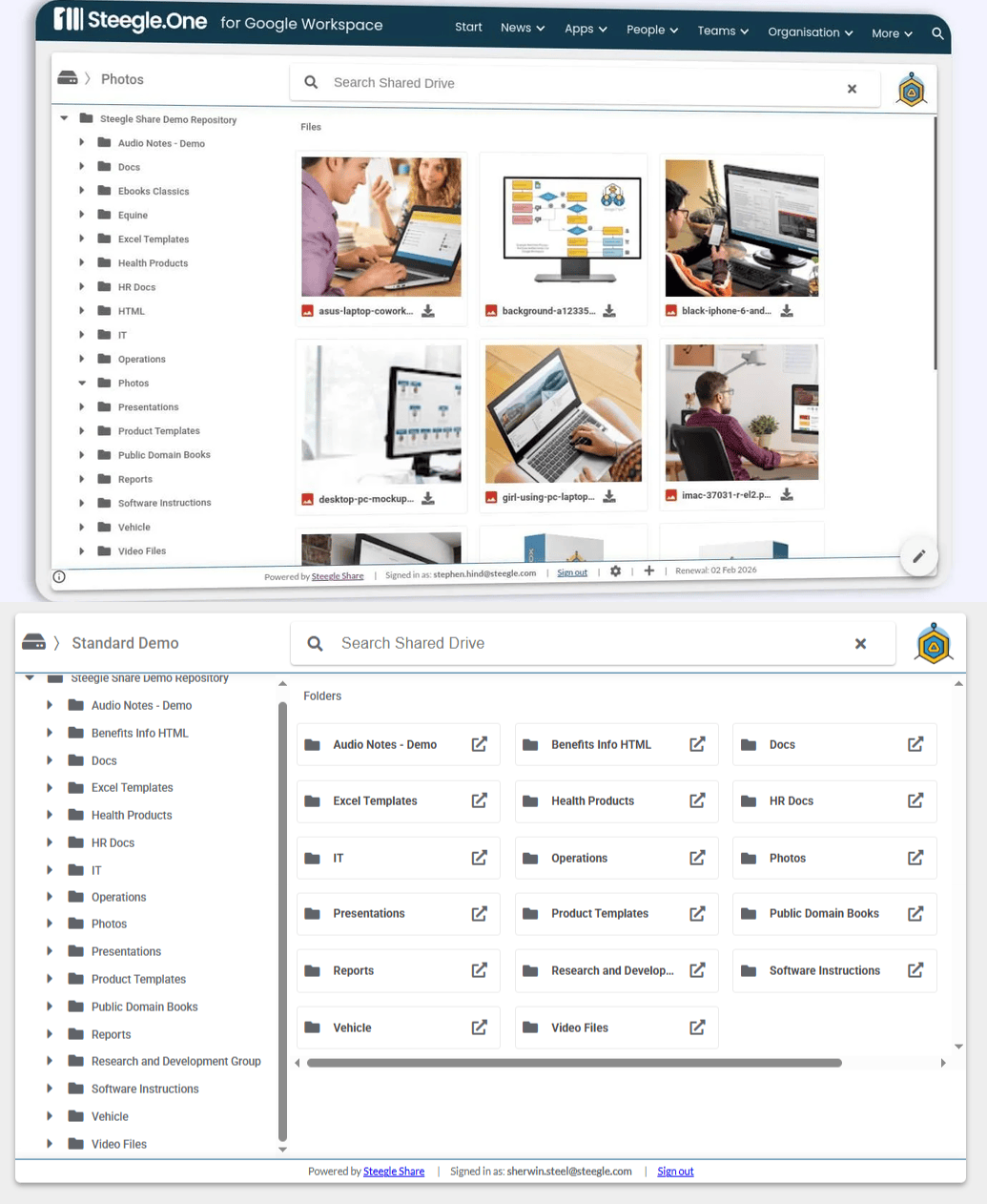
In practice: Create one sales page with a Steegle Share widget. Add generic resources to a "Public" folder and confidential reports to a "Sales Team Only" folder in Drive. When the VP of Sales visits the page, she sees everything. When someone from Finance visits, they see only public resources.
Same page. Same widget. Personalized automatically through Drive permissions everyone already understands.
No audience groups to define. No membership lists to maintain. No troubleshooting why someone can't see what they should. The permissions you're already managing in Google Drive do all the work.
3. Smart Navigation and Information Architecture
Clear structure often eliminates the need for hiding content. When information is well-organized and easy to find, users naturally navigate to what's relevant without needing every page personalized.
This isn't a limitation—it's a feature. Transparency and discoverability beat hidden content in most organizational contexts.
4. Multiple Sites: Only When Absolutely Necessary
While Steegle Share and Google Drive permissions handle the vast majority of access control needs, there are rare situations where creating separate Google Sites for distinct groups becomes necessary—such as when you need to completely isolate highly sensitive information or comply with strict regulatory requirements that demand absolute separation.
When multiple sites are truly vital, you can create separate Google Sites for specific audiences (HR, clinical staff, executive leadership ) and link them together through navigation. Users experience one integrated intranet while administrators manage access through standard Google Workspace sharing.
However, this approach should be the exception, not the rule. Multiple sites introduce management overhead and complexity that most organizations don't need. Start with Steegle Share and Drive permissions—they solve the vast majority of access control challenges without the administrative burden.
What Works in Practice: Lessons From 100+ Organizations
After working exclusively with Google Workspace intranets for over a decade, clear patterns emerge:
•Limited targeting is useful. Separating staff and student communications in a school district makes sense. Creating distinct sites for clinical and administrative teams in healthcare organizations serves a clear purpose.
•But most organizations succeed through clarity, not complexity. The best intranets connect people through good navigation, consistent design, clear content ownership, and a culture of transparency—not through elaborate audience rules that require constant maintenance.
•The tools that look most sophisticated in demos often create the most friction in daily use. Simple systems that people actually maintain outperform complex systems that become unmanageable.
•Administrative overhead is real. Communications teams don't have unlimited time. Every feature that requires ongoing configuration is time not spent creating valuable content.

Compliance Gets Easier, Not Harder
Healthcare providers, financial services, and other regulated industries need strong data security and access control.
Here's the advantage of Steegle.One's simpler model: because permissions are based on Google Drive (which IT already manages ), the intranet manager can't accidentally break compliance. There are fewer moving parts, fewer places where permissions can be misconfigured, and fewer opportunities for sensitive data to leak.
All data stays within your Google Workspace environment, protected by Google's enterprise security and compliance certifications (SOC 2, ISO 27001, HIPAA support). No data replication to third-party servers. No parallel permission systems to maintain and audit.
IT manages Drive permissions. Steegle Share respects them automatically. Compliance happens by design, not through administrative vigilance.
Frequently Asked Questions
Steegle.One for Google Workspace
-
Usually not. The administrative burden typically outweighs the benefits. Good navigation and smart tools like Steegle Share deliver relevance without the maintenance overhead.
-
Three ways: separate Sites for major audiences, Google Drive permissions for embedded files, and Steegle Share widgets that automatically show users only what they can access in Drive—no audience groups required.
-
Most don't miss SharePoint's audience targeting once they experience how much easier Steegle.One is to maintain. In fact, many organizations discover that the complexity of SharePoint's permission model—with its difficult site structures, permission trees, and constant maintenance overhead—was a significant barrier to adoption. [Webmaster: Link to "SharePoint Migration Center" at https://one.steegle.com/migration/sharepoint]
When migrating to Steegle.One, organizations typically find that their SharePoint's sophisticated audience management features weren't being used effectively anyway. Instead of recreating that complexity, we help teams transition to a simpler model built on Google Drive permissions and Steegle Share, which delivers the same security and relevance with a fraction of the administrative burden.
Our proven migration methodology ensures a smooth transition, with strategic change management and targeted training to drive adoption. We've successfully guided organizations through this shift, and the feedback is consistently positive: teams appreciate how much easier the new system is to maintain while delivering better results. [Webmaster: Link to "Migration Case Studies" at https://one.steegle.com/migration/sharepoint]
-
They offer more features but require more people to manage them. Steegle.One delivers what teams actually need—relevant, secure content—without the administrative burden that exhausts small communications teams. [Webmaster: Link to "Steegle.one vs. The Rest" at https://one.steegle.com/features]
-
It's a trade-off, but for most organizations it's the right one. You gain simplicity, sustainability, and lower overhead. With Steegle Share's dynamic display and Drive permissions, you achieve security and relevance through approaches people can actually maintain.

The Bottom Line
The goal of an intranet isn't to create perfectly personalized silos—it's to connect people and help everyone find what they need efficiently.
After years of watching organizations struggle with complex audience management systems, we built Steegle.One differently. It's designed around how real communications teams actually work: small, busy, and focused on content rather than configuration.
Audience management looks impressive in demos, but simplicity wins in daily practice. And that's exactly what Steegle.One delivers—an intranet platform that works with how organizations actually operate.
Ready to see how Steegle.One manages access and relevance without complex audience rules?
#SteegleOne #GoogleSites #Intranet #InternalCommunications #GoogleWorkspace #DigitalWorkplace #AudienceManagement #SharePointMigration #EmployeeEngagement #SimplifyWork
Related Insights
-
![Healthcare Burnout]()
Tackling Healthcare Worker Burnout: How Steegle.One Intranet Can Help
Tackling Healthcare Worker Burnout: How Steegle.One Intranet can help health care workers in the U.S. have faced increased stress due to systemic...
-
![Is Steegle.One a Digital Engagement Platform?]()
Is Steegle.One a Digital Engagement Platform?
Is Steegle.One a Digital Engagement Platform? As a member of the Steegle team, I was recently asked by a prospective client if Steegle.One is a...
-
![]()
Beyond Workvivo: Why Meta’s Migration Offer Isn’t the Only Answer
Beyond Workvivo: why Meta's Workplace migration offer Isn't the only answer Introduction Meta's decision to discontinue Workplace and offer a...